- Get link
- X
- Other Apps
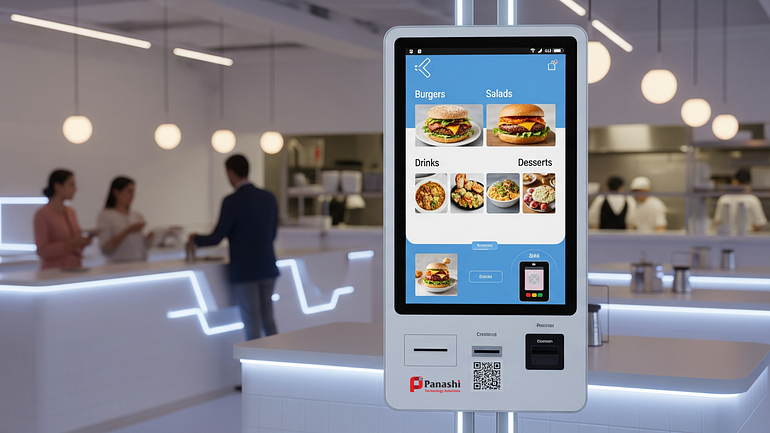
In 2026, quick service restaurants (QSRs) are under more pressure than ever. Labor shortages make it harder to staff peak hours. Rush-hour lines frustrate guests and cause walkouts. Order mistakes lead to refunds, wasted food, and poor reviews. At the same time, food, rent, and operating costs keep rising, leaving little room for error.
This is where self-service kiosks have become a quiet but powerful advantage. Once seen as optional technology, kiosks are now a proven tool to improve speed, accuracy, and guest satisfaction — without sacrificing service quality. For many QSRs, they act as a second ordering lane that never calls in sick and never mishears an order.
In this guide, you will learn why kiosks work so well in 2026, what they do best for QSRs, how to roll them out the right way, and how to measure success using simple, meaningful metrics. The goal is not to replace people, but to build a smoother, more profitable operation.
Why Self-Service Kiosks Win in 2026 (and What Makes Them Different Now)
Self-service kiosks are no longer just touchscreens that take orders. In 2026, they are smarter, faster, and better integrated into real restaurant workflows. Most importantly, they solve real QSR problems.
Faster Lines, Fewer Mistakes, and Happier Guests
Long lines are one of the biggest reasons guests abandon QSRs during busy hours. Kiosks reduce this pressure by shifting simple and repeat orders away from the front counter. Guests who already know what they want can order immediately, without waiting to speak to a cashier.
Guided ordering plays a big role here. Clear food photos, step-by-step modifiers, and confirmation screens help guests place accurate orders. There is no risk of misheard items, missed modifiers, or unclear handwriting. What the guest selects is exactly what reaches the kitchen.
Speed also improves behind the scenes. Cleaner, more consistent tickets help the kitchen work faster and with fewer questions. This reduces remake rates and keeps the line moving, especially during lunch and dinner rushes.
Higher Check Sizes Without Pushy Selling
One of the most consistent benefits of kiosks is higher average order value. Unlike a rushed cashier, a kiosk can calmly suggest add-ons at the right moment. When done well, these upsells feel helpful, not aggressive.
Common examples include:
- “Make it a combo”
- “Add extra protein”
- “Upgrade to a premium side”
- “Add a drink or dessert”
- “Try our limited-time offer”
Because guests are in control, they are more open to exploring options. Many QSRs see a 10–30% lift in average order value through kiosks, simply by presenting choices clearly and at the right time.
Labor Relief That Protects Service Quality
Kiosks are not about replacing staff. In 2026, they are about using staff better. By reducing pressure at the order counter, employees can focus on higher-value tasks like greeting guests, managing pickup, assisting with special requests, and keeping the dining area clean.
This also reduces stress during peak hours. New hires can ramp up faster because they are not immediately thrown into high-pressure order taking. Experienced staff can focus on service and speed instead of repeating the same questions all day.
The result is better service quality, even with leaner teams.
Better Data for Smarter Menus and Marketing
Every kiosk interaction creates useful insights. Operators can see which items are most popular, which modifiers are frequently added or skipped, and where guests abandon orders.
This data helps answer practical questions:
- Which items slow guests down?
- Which add-ons actually convert?
- What sells best at lunch vs dinner?
- Which promotions perform well?
With this information, QSRs can simplify menus, improve layout, and run targeted offers without guessing. The key is that the data is actionable and easy to understand, not technical or overwhelming.
How to Choose and Set Up Kiosks That Guests Actually Use
Buying a kiosk is easy. Making sure guests actually use it is the real challenge. A successful rollout focuses on simplicity, reliability, and flow.
Must-Have Features for QSR Kiosk Success
The best kiosks for QSRs share a few essential features:
- Simple menu navigation with clear categories
- High-quality item photos that match what guests receive
- Easy modifiers without too many steps
- Accessibility options like large text, good contrast, and reachable screen height
- Multiple payment methods, including tap, chip, and mobile wallets
- Loyalty integration to earn and redeem rewards
- Multilingual support where needed
Reliability is just as important. Look for basics like offline-safe payments, quick reboot options, and remote monitoring so issues can be fixed fast.
Store Layout and Flow: Where Kiosks Should Live
Placement matters more than most operators expect. Kiosks should be:
- Visible from the entrance
- Easy to understand at a glance
- Not blocking the main line or entrance
- Positioned with enough space for groups or families
Clear signage helps reduce confusion. Simple messages like “Order Here” and “Pick Up There” go a long way. During the first few weeks, assign a staff member as a “kiosk coach” during busy hours to guide guests and build confidence.

Kitchen and POS Integration: Avoid the Hidden Failure Points
For kiosks to work smoothly, they must connect properly with:
- POS systems
- Kitchen display systems (KDS)
- Pricing and tax rules
- Inventory and modifiers
Common issues include mismatched menus between kiosks and counters, confusing modifier logic, and large orders overwhelming the kitchen at peak times. A simple checklist before launch can prevent most of these problems.
Security, Privacy, and Compliance Basics in Plain English
Operators should ask vendors clear questions about:
- Payment security standards
- How customer data is stored
- Who can access settings and reports
- Update and patch schedules
- Device management and remote controls
Keep customer data minimal and collect clear consent for loyalty or marketing. Simpler systems are usually safer and easier to manage.
Make Kiosks Pay Off: Track the Right Metrics and Keep Improving
Kiosks deliver value only when performance is measured and improved over time.
The KPI Dashboard Every QSR Should Watch
Focus on a small set of clear metrics:
- Kiosk adoption rate: percentage of orders placed via kiosks
- Average order value (AOV): compare kiosk vs counter
- Order accuracy: voids, remakes, and refunds
- Peak throughput: orders per hour during rush
- Wait time to pickup
- Loyalty sign-ups
Guest feedback also matters. Short surveys or QR codes on receipts can reveal friction points early.
Common Kiosk Mistakes in 2026 and How to Avoid Them
Avoid these common issues:
- Too many screens before checkout → simplify flows
- Cluttered menus → highlight best sellers
- Aggressive upsells → keep them relevant and optional
- Slow payments → support fast tap-to-pay
- Poor signage → guide guests clearly
- Untrained staff → coach and support guests
- Unsynced menus across channels → keep everything aligned
Review performance weekly and monthly, making small improvements instead of big overhauls.
Conclusion
In 2026, self-service kiosks are a growth lever for QSRs when used correctly. They improve speed, reduce errors, raise check sizes, and give guests more control over their experience. The real value comes not from cutting labor alone, but from building a smoother, more reliable operation.
The smartest approach is to start with a pilot, train staff to support guests, and track key KPIs for 30 to 60 days. From there, refine layouts, menus, and upsells based on real data. A simple audit of your current ordering flow or a vendor checklist is the best next step before investing.
Frequently Asked Questions (FAQs)
1. Are self-service kiosks worth it for small QSRs?
Yes. Even small QSRs benefit from reduced wait times, higher order accuracy, and increased average order value, especially during peak hours.
2. Will kiosks replace staff in restaurants?
No. Kiosks support staff by handling routine orders so employees can focus on service, speed, and guest experience.
3. How many kiosks does a QSR need?
Most locations start with 1–2 kiosks per ordering lane and adjust based on traffic and adoption rates.
4. Do older customers use kiosks?
Yes, when kiosks are designed with clear text, simple flows, and staff support during early adoption.
5. How long does it take to see ROI from kiosks?
Many QSRs see measurable improvements in AOV and throughput within 30–60 days of proper rollout.
6. Can kiosks work with delivery and online ordering systems?
Yes. The best setups keep menus, pricing, and modifiers synced across kiosks, apps, and delivery platforms.
Comments
Post a Comment