- Get link
- X
- Other Apps
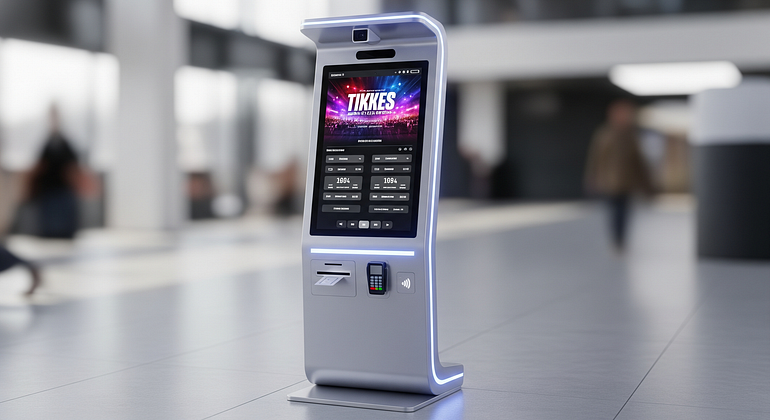
Event organizers know the stress that comes with long check-in lines, busy staff, frustrated guests, and last-minute changes. When crowds build up at the entrance, the pressure rises and the guest experience suffers before the event even begins. Ticketing kiosks help solve many of these issues at once. These self-service machines make check-ins faster, reduce staff workload, and keep guests moving smoothly. In this article, you’ll discover 10 clear reasons why event organizers should use ticketing kiosks, based on real-world benefits like faster entry, happier guests, and better data. The goal is simple: give you practical, easy-to-follow insights that help make your next event run smoother and smarter.
What Are Ticketing Kiosks and How Do They Work at Events?
Ticketing kiosks are self-service machines that guests use to buy tickets, print tickets, check in, or pick up badges at events. You’ll see them at concerts, music festivals, sports stadiums, trade shows, and conferences. Instead of waiting in a long line for a staff member, guests walk up to a kiosk and complete their entry in just a few steps.
Self-service ticketing explained in simple terms
Self-service at an event is similar to using a self-checkout at a store or the boarding pass kiosks at airports. Guests handle basic steps on their own without needing staff help. At events, this doesn’t replace staff. Instead, kiosks work with the team, taking care of routine tasks while human staff focus on special requests or issues. This balance keeps lines short and makes guests feel more in control.

10 Powerful Reasons Event Organizers Should Use Ticketing Kiosks
1. Faster check-in and shorter lines at the entrance
Ticketing kiosks allow multiple guests to check in at the same time, which reduces pressure at the doors. Instead of waiting for staff, guests can scan a QR code or email ticket and receive their entry pass in seconds. Shorter lines create a better first impression and reduce frustration. They also support safety by preventing large crowds from forming in one place. For busy events, this is one of the biggest advantages.
2. Less pressure on staff and lower labor costs
Kiosks handle simple tasks like scanning, printing, and basic ticket lookups. This frees staff to focus on customer support, VIP guests, or special issues. When staff are not overwhelmed, they offer better service. Kiosks can also reduce overtime costs or the number of temporary workers needed for check-in. They are not meant to replace workers, but to assist them and make operations smoother.
3. Fewer ticketing errors and cleaner guest data
When staff are rushed, small mistakes can happen — wrong ticket types, incorrect spellings, or missing guest details. Kiosks reduce these errors by guiding guests with required fields and clear steps. This leads to cleaner, more accurate data in the event system. Better data means improved reporting, easier follow-up emails, and stronger marketing for future events.
4. 24/7 ticket sales and on-site upgrades
Ticketing kiosks can keep selling tickets even when the box office is closed. This helps last-minute buyers, early arrivals, or guests who want to upgrade to VIP, add parking, or switch time slots. Kiosks open new revenue opportunities without adding more staff. This flexibility helps increase overall event earnings with very little effort.
5. Better guest experience with quick, simple self-service
Many guests prefer doing things on their own. Kiosks offer a smooth, simple experience with clear steps, helpful screens, and multiple language options. When guests check in quickly without waiting, their event experience starts on a positive note. This reduces stress and creates a more welcoming environment.
6. Real-time reporting and smarter event decisions
Kiosks send data directly into the event ticketing system in real time. Organizers can instantly see how many people have checked in, which ticket types are trending, and what times are busiest. With this information, organizers can open more gates, move staff, or run last-minute promotions. This level of insight helps events run more efficiently and avoid overcrowding.
7. Improved security and better access control
Every ticket or wristband printed at a kiosk has a unique QR code or barcode linked to the system. This reduces fraud, duplicate tickets, and unauthorized entry. Kiosks also support zone-based access control for backstage areas, VIP sections, or age-restricted zones. Automatic logs make it easier for organizers to check who entered where and when.
8. Easier compliance with health and safety rules
Kiosks can collect waivers, safety acknowledgments, or required screening questions before guests enter. This keeps lines moving while still meeting legal or venue requirements. Digital records are stored securely and can be retrieved easily if proof is needed later. This is much more efficient than dealing with paper forms.
9. Flexible branding and sponsorship opportunities
Kiosk screens can display sponsor logos, event branding, or short messages. Printed tickets and wristbands can also include promotional offers or coupon codes. These features make sponsorship packages more attractive and can help organizers recover kiosk costs. Custom branding also creates a more professional look at the entrance.
10. Scales easily from small events to large festivals
Whether it’s a school play or a city festival, kiosks can scale with event size. Organizers can start with a few units and add more as needed. The same simple check-in process works for trade shows, stadium events, and large outdoor festivals. This makes ticketing kiosks a long-term, flexible investment.

Practical Tips for Adding Ticketing Kiosks to Your Next Event
Plan where kiosks go and how guests will find them
Place kiosks near main entrances, parking pathways, or will-call counters. Make sure signs clearly point guests toward them. Keep enough space so users do not block walkways or emergency exits. Have at least one staff member nearby to guide first-time users. Always test each kiosk before gates open to avoid surprises.
Train staff and test the self-service flow before event day
Run through the full check-in and ticket-printing process on each kiosk. This helps identify any confusing steps for guests. Train staff to assist quickly without slowing down the line. Keep one staffed counter available as a backup in case of power or network issues. A little preparation ensures a smooth event day.
Conclusion
Ticketing kiosks offer a powerful way to improve event operations. They reduce long lines, lower staff pressure, create happier guests, and provide real-time data that improves planning. Organizers don’t need a huge budget or technical team to get started. A small setup can make a big difference. As your events grow, you can easily add more kiosks. If you want smoother check-ins and better guest experiences, consider adding ticketing kiosks to your next event or talk with a trusted ticketing partner to explore your options.
FAQs
1. Are ticketing kiosks hard to use?
No. They use simple touch screens with clear steps. Most guests can complete check-in in under 30 seconds.
2. Do I need technical staff to manage kiosks?
No. Once set up, kiosks run automatically. Your team only needs basic training.
3. Can kiosks print wristbands and badges?
Yes. Most kiosks support ticket printing, badge printing, and wristband dispensing.
4. How many kiosks do I need for my event?
Small events may use 2–4 kiosks. Larger festivals may use 10 or more. It depends on guest volume.
5. Can kiosks work offline?
Some models support offline mode, but most require a stable internet connection for real-time data sync.
Comments
Post a Comment