Introduction
Think about the last time you checked in for a flight, ordered a meal from a touchscreen, or paid for parking without speaking to an employee. Behind these simple experiences is a kiosk machine a self-service technology designed to help people complete specific tasks quickly and independently. Kiosks are now used across restaurants, airports, retail stores, hospitals, banks, hotels, and government facilities. But what exactly is a kiosk machine, and how does it work? This guide explains what kiosk machines are, their main types, how their hardware and software work together, their benefits and limitations, costs, and what businesses should consider before investing in one.
What Is a Kiosk Machine and How Does It Work?
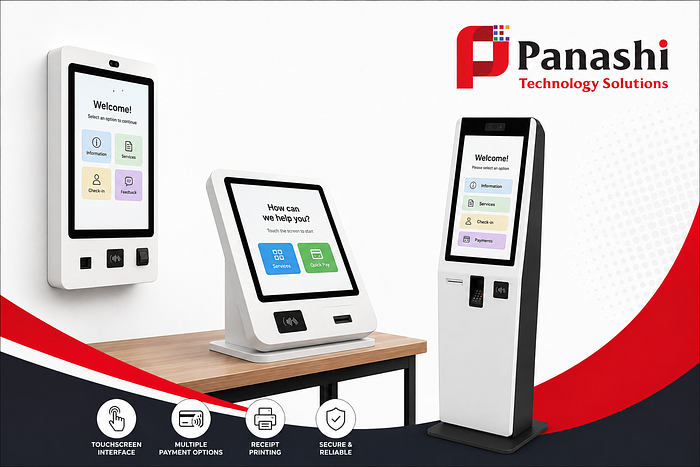
A kiosk machine is a self-service computer system designed to perform a specific task with limited or no direct staff assistance. It typically combines a touchscreen display, computer, specialized software, secure enclosure, and optional hardware such as a payment terminal, barcode scanner, printer, camera, or card reader.
Unlike a simple digital display that only shows information, an interactive kiosk allows users to take action. Depending on its purpose, a customer may use it to place an order, make a payment, print a ticket, check in, verify an identity, find information, or complete a form.
Kiosks can connect to the internet through Wi-Fi, Ethernet, or cellular networks to communicate with business systems. Some solutions can also store selected information locally and continue operating partially offline when connectivity is temporarily unavailable.
Common examples include restaurant self-ordering kiosks, airport check-in kiosks, ticket machines, healthcare check-in stations, retail price-checking kiosks, information kiosks, and banking or payment kiosks.
The Main Types of Kiosks You See in Daily Life
Kiosk machines can be grouped according to the task they perform:
- Information kiosks: Help visitors find directions, services, schedules, product information, or facility details.
- Transaction and payment kiosks: Allow users to make payments, pay bills, or complete financial transactions.
- Self-service ordering kiosks: Common in restaurants and food outlets for browsing menus, customizing orders, and paying.
- Check-in kiosks: Used at airports, hospitals, hotels, and other facilities to speed up registration and check-in.
- Ticketing kiosks: Allow customers to purchase or collect tickets for transportation, entertainment, events, and attractions.
- Retail kiosks: Support activities such as product searches, price checking, ordering, payments, and customer assistance.
One kiosk can also combine multiple functions. For example, a kiosk may scan an identification document, accept payment, print a receipt, and provide a confirmation number from the same machine.
How Kiosk Machines Process a User’s Request
A kiosk machine works by connecting the user interface, software, hardware, and business systems into one guided workflow.
The process generally begins when a user taps the welcome screen or selects an option using physical controls. The touchscreen or input device sends that information to the kiosk’s software. The software then follows predefined workflow rules and, when necessary, communicates with external systems such as a booking platform, inventory database, customer management system, or payment gateway.
After processing the request, the kiosk produces an output. This could be a receipt, ticket, order number, visitor badge, payment confirmation, or another document.
For example, at a restaurant, a customer can select menu items, customize an order, review the total, make a payment, and receive an order number. At an airport, a traveler may enter or scan their information, confirm flight details, select available options, and receive a boarding document or baggage-related output.
Modern kiosk systems may use Wi-Fi, Ethernet, cellular connectivity, barcode and QR scanners, card readers, NFC readers, cameras, and printers. Security measures such as encrypted connections, secure payment processing, user permissions, and automatic software updates help protect transactions and customer data.
The Hardware and Software Inside a Self-Service Kiosk
The physical components of a kiosk depend on its purpose and environment. Common hardware includes:
- Touchscreen display
- Touch interface or physical keypad
- Embedded computer
- Secure kiosk enclosure
- Payment terminal
- Barcode or QR scanner
- Card or ID reader
- Receipt or document printer
- Speakers
- Camera
- Accessibility controls
The software provides the intelligence behind these components. It manages the user interface, workflow rules, payment processing, inventory or booking connections, authentication, reporting, and remote device management.

What Happens When a Kiosk Goes Offline or Needs Help?
A kiosk is not completely independent in every situation. Connectivity problems, hardware failures, payment errors, or printer issues can interrupt service.
Depending on the system, safeguards may include offline transaction queues, backup connectivity, error messages, remote diagnostics, and automatic alerts that notify staff when attention is required.
Kiosks may also need routine cleaning, paper replacement, software support, maintenance, and physical repairs. For example, if a receipt printer runs out of paper or a payment fails, staff may still need to intervene.
This is why a good kiosk deployment includes both technology and a reliable support plan.
Kiosk Benefits, Costs, and Practical Buying Considerations
A well-designed kiosk can improve service efficiency, but it is not automatically the best solution for every task.
Key benefits include:
- Shorter waiting times: Customers can complete routine tasks without waiting for an available employee.
- 24/7 availability: Kiosks can provide service beyond traditional operating hours.
- Consistent workflows: Every user follows the same guided process.
- Multilingual service: Multiple languages can make services more accessible to different customer groups.
- Lower repetitive workload: Employees can spend less time handling routine transactions.
- Improved data collection: Digital interactions can provide useful operational and customer insights.
- Greater customer control: Users can complete simple tasks at their own pace.
However, businesses should also consider limitations such as upfront hardware costs, maintenance, accessibility requirements, cybersecurity risks, downtime, user frustration, and the need for human assistance.
The total cost of a kiosk machine can include hardware, custom software, payment processing, installation, internet connectivity, support, repairs, security updates, and ongoing maintenance. Therefore, comparing kiosks based only on screen size or hardware price can give a misleading picture of the real investment.
Before purchasing a kiosk, businesses should evaluate:
- What specific task will the kiosk perform?
- How many users are expected each day?
- Where will the kiosk be installed?
- What accessibility features are required?
- Which payment methods are needed?
- Does it need to integrate with existing business software?
- What security and data protection measures are required?
- Can the kiosk be monitored and managed remotely?
- What warranty and maintenance support does the vendor provide?
- What will the total cost be over the kiosk’s expected lifetime?
When a Kiosk Is Better Than a Staffed Service Counter
Kiosks are particularly effective for routine, repeatable, and clearly defined tasks. Good examples include ordering food, purchasing tickets, checking in, making simple payments, collecting forms, finding directions, and completing basic registrations.
However, kiosks should not always be viewed as replacements for employees. Staff remain essential when customers need complex decisions, personal assistance, accessibility support, sensitive services, or human interaction and trust.
The strongest approach is often a hybrid service model. Kiosks handle simple and repetitive tasks while employees focus on more complicated requests and customer support. This can improve efficiency without removing the human element from the customer experience.
Conclusion
A kiosk machine is a purpose-built computer that allows people to complete specific tasks through a guided self-service interface. The basic workflow is simple: the user provides information, the kiosk software processes the request through connected systems, and the machine delivers a result such as a payment confirmation, ticket, receipt, order, or badge. The best kiosk solution depends on the task, users, location, accessibility requirements, security needs, integrations, and long-term support plan. Choosing the right combination of hardware, software, and service support is key to building a successful self-service experience.
Comments
Post a Comment